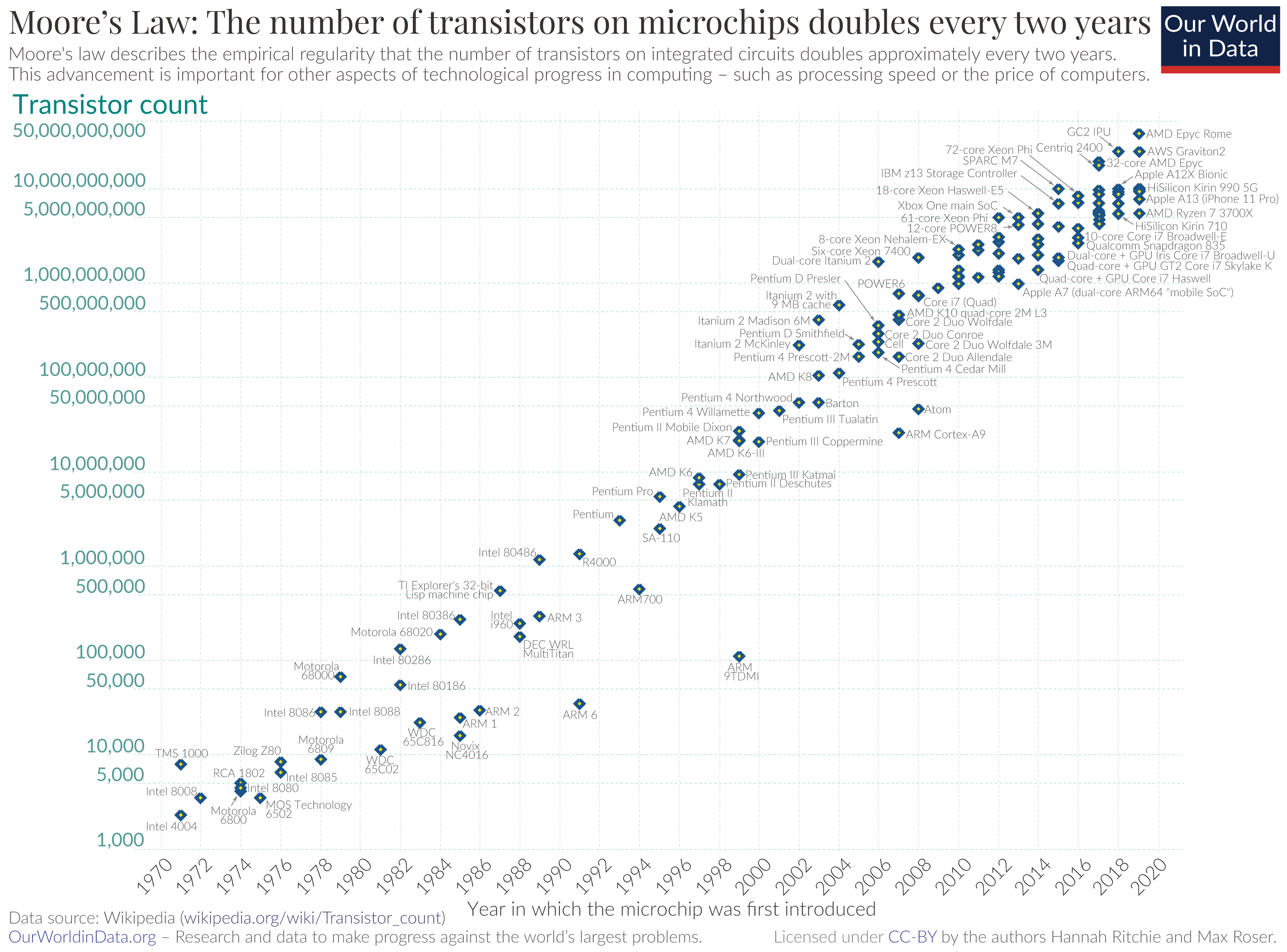
In this article, I will place what I believe are relevant videos about computer history and comment on them. Since the 70s, we have been watching the exponential growth of transistor counts — famously known as Moore’s Law — in which the number of transistors on a chip roughly doubled every two years. Each decade brought an exponential leap in processing power, enabling smaller, faster, and more affordable machines. What once required an entire room now fits in the palm of our hands — and this evolution is beautifully captured in the videos I’ve selected.
As you go through them, you’ll see how each technological milestone not only pushed hardware capabilities forward but also shaped the way we work, communicate, and create. From the earliest microprocessors to modern integrated systems, this timeline reveals how rapidly innovation has transformed our world.
BBSs and Hacking
Terminals and Videotext
Long before the internet existed as we know it today, what existed were BBSs (Bulletin Board Systems). The term bulletin board refers to those cork notice boards where papers were pinned with thumbtacks covering a wide variety of subjects.
The idea was to create an electronic system where university students or company employees could communicate through messages and announcements, share files, and collaborate on projects.
At American universities, since the 1970s, DEC VT100 terminals were already available for students to work on time-sharing systems, which distributed small intervals of processing time between each session, giving the impression that each user had a dedicated computer. Each terminal was connected through a serial port to a central server, typically a DEC PDP-11, using a star topology: the terminals connected to a terminal server, a concentrator with multiple serial ports, which in turn connected to the main server. VT100 terminals could also connect remotely to the server using a modem, usually at 300 or 1200 bps.
Throughout the 1980s, these concentrators evolved to support Ethernet, and remote terminals stopped connecting via direct RS-232, beginning instead to communicate through networks. In this context, the VT100 terminal standard, originally from DEC, became consolidated. BBSs and multi-user systems began adopting implementations compatible with this standard — often partial or with their own extensions — for text display, screen control and colors, with the most common format becoming known as ANSI BBS. This compatibility allowed different terminals and microcomputers to access systems in a uniform way, and this set of codes based on ANSI/VT100 eventually became a de facto standard, still widely used today in terminal emulators, Telnet connections and Unix environments.
There were also public services around the world. Minitel (Médium Interactif par Numérisation d'Information Téléphonique) began to be deployed commercially in 1982 in France. The project was developed by the PTT (Postes, Télégraphes et Téléphones), predecessor of the current France Télécom.
The Minitel terminal was a small dedicated computer with a keyboard, monochrome display and integrated modem. Originally, it was delivered free of charge to telephone subscribers to replace the printed telephone directory. The Minitel was not a general-purpose computer like the PCs of the time; it was used exclusively to access network services. It was a videotext terminal used to access services through telephone lines.
Among the available services were: telephone directory, messaging, news, shopping, reservations, banking and government services. At the system’s peak, more than 25 million terminals were in use in France, making Minitel one of the largest pre-internet online services in the world. The service was retired in 2012 after more than 30 years of operation.
Minitel Terminal                         DEC VT100 Terminal
In the United States, several paid services accessed via modem appeared. CompuServe, started in 1979, offered email, forums, news, stock market quotes and games. Prodigy, launched in 1984, was a service similar to Minitel, developed by IBM in partnership with the Sears retail chain.
The most interesting aspect is that in the early 1980s, with the popularization of Apple computers and the first IBM PCs, the computer became personal. For the first time it became possible to have a computer at home and connect it to university or corporate systems, or public and commercial services, using the telephone line.
An Apple II cost around US$1,000 at the time, an extremely high price for Brazilian reality, until national manufacturers began producing cheaper clones. Even so, computers and modems continued to be luxury items and were rarely found in households.
In Brazil, Videotext had little diffusion and a very limited infrastructure, restricted to local services such as telephone directories and chat. Since the government did not develop a simple terminal for subscribers, few Brazilians owned personal computers, which reached prohibitive prices in the national market. The available telephone lines were scarce and unstable, limiting the reach of the service. Without accessible dedicated terminals, only those who already had a PC could use the system. In addition, the services offered were basic and fragmented, without standardization. This combination of factors kept Videotext restricted to experimental niches and companies.
Embratel, the Brazilian state telecommunications company, created the Ciranda project, an attempt to establish a national data communication network. The project, however, had little reach. I remember my father dialing from São Paulo to Rio de Janeiro to access this experimental network, using a modem that he himself patented for the Apple II, the Unimodem.
Telephone Infrastructure and Modems
US Robotics Courier V.Everything
The telephone cable infrastructure was known as POTS (Plain Old Telephone System). The modem’s function was to convert digital computer data into analog audio signals to travel across the telephone line and, on the other side, perform the reverse process. Error correction protocols and handshakes negotiated the highest possible speed between the two sides — that characteristic sound heard at the moment the connection was established.
The term baud is often confused with bps (bits per second), but they do not mean the same thing. Baud refers to the number of symbols transmitted per second, where a “symbol” is simply a state or variation of the electrical signal, not letters or characters. The term comes from telegraphy, where each change in the signal represented a symbol. In early modems, each symbol carried only one bit of information, making baud and bps have the same value. With advances in modulation techniques, it became possible to encode multiple bits into a single symbol, allowing the transmission rate in bps to increase without increasing the baud rate.
Modems were slow because telephone lines were analog and designed only for voice transmission, and they also suffered from high noise levels and irregular quality. For decades, the Bell System maintained strict control over the lines and equipment, using technical and bureaucratic restrictions to preserve its monopoly. This prevented the direct electrical connection of modems to the telephone network. As an alternative, acoustic couplers were used: a base with a speaker and microphone where the handset was placed, transmitting and receiving signals through sound and avoiding any electrical contact with the network. This solution delayed the evolution of the technology because it limited speeds to around 300 bps, reaching at most 1200 bps under ideal conditions. Only with the breakup of the AT&T monopoly, finalized in 1984, was the market truly liberalized, allowing the advancement of direct-connect modem technology and increasingly faster transmission speeds.
Modems of the time followed standards such as V.22, offering 1200 bps download and only 75 bps asynchronous upload. It was slow even to draw characters on the screen, and even slower to transmit data.
The standardization of home modems began in the late 1970s with Hayes Microcomputer Products, which released one of the first widely accepted modems for microcomputers. Hayes also defined the AT command standard, which would become practically universal and allow different software to control modems from different manufacturers in a standardized way — a decisive factor in the expansion of BBSs.
These standards gradually evolved to X2 and V.90, which allowed theoretical speeds of up to 56 kbps. After that, technologies such as ADSL (Asymmetric Digital Subscriber Line) began to appear, allowing typical connections of 256 kbps or more, about five times faster than an analog dial-up line.
This marked the beginning of what became known as broadband. Other technologies also emerged during this period, such as satellite download with dial-up upload, microwave radio links, cable TV connections and, finally, fiber optics.
During this period, connection speeds evolved gradually, as illustrated in the following table, which shows the main modem standards, their typical speeds and the time required to transfer files of different sizes. Even so, long downloads were common, and any dropped line could mean hours lost.
Serial Port Speed Standards — Timeline
| UART / Chip | Approximate year | Buffer (FIFO) | Typical supported speed |
|---|---|---|---|
| 8250 | 1981 | No FIFO | up to 9,600 bps (19,200 unstable) |
| 16450 | 1984 | No FIFO | up to 19,200 bps (38,400 at the limit) |
| 16550 | 1987 | Defective FIFO (disabled) | same as 16450 |
| 16550A | 1988 | Dual FIFO (TX/RX) of 16 bytes | 38,400 / 57,600 / 115,200 bps |
| 16650 | 1992 | Dual FIFO (TX/RX) of 32 bytes | 115,200 bps stable |
| 16750 | 1995 | Dual FIFO (TX/RX) of 64 bytes | 230,400 bps |
| 16850 / 16950 | Late 1990s | Dual FIFO (TX/RX) > 64 bytes | 460,800 bps or more |
The evolution of modems under standards such as V.22, V.32, V.34 and later was only possible because PC serial ports also evolved. The emergence of the UART 16550A, with its FIFO buffer, allowed computers to keep up with the high data rates of modems without losing information.
Programs such as Procomm Plus used this feature efficiently, detecting the UART and enabling the FIFO, reducing interrupts and ensuring stable serial communication even at higher speeds such as 57,600 or 115,200 bps. This combination of appropriate hardware and optimized software was fundamental in making dial-up connections faster and more reliable.
Modem Speed Standards — Timeline
| Standard release year | Standard / Modem | Modulation | Speed (bits/s) | 1 MB Download |
|---|---|---|---|---|
| 1964 (V.21) | 300 baud (Bell 103 / V.21) | FSK | 300 | ≈ 7h 45min |
| 1964 (V.23) | V.23 (Minitel / Videotext) | FSK | 1200 / 75 | ≈ 1h 56min |
| 1976 (Bell 202) | 1200 bps symmetric (Bell 202) | FSK | 1200 | ≈ 1h 56min |
| 1984 (V.22bis) | V.22bis / 2400 bps | QAM | 2400 | ≈ 58min |
| 1984 (V.32) | V.32 / 9600 bps | Trellis (TCM) | 9600 | ≈ 15min |
| 1991 (V.32bis) | V.32bis / 14,400 bps | Trellis (TCM) | 14,400 | ≈ 10min |
| 1994 (V.34) | V.34 / 28,800 bps | QAM + Trellis | 28,800 | ≈ 4min 50s |
| 1996 (V.34) | V.34 / 33,600 bps | QAM + Trellis | 33,600 | ≈ 4min 10s |
| 1998 (V.90) | V.90 / 56k | PCM (downstream) / QAM (upstream) | 56,000 / 33,600 | ≈ 2min 30s |
Transfer Protocols — Timeline
| Protocol | Year | Type | Error Detection | Main Characteristics | Advantages | Disadvantages |
|---|---|---|---|---|---|---|
| XMODEM | 1977 | 128B blocks | Checksum | First popular file transfer protocol over serial lines. | Very simple and widely supported. | Slow; high overhead; no batch support. |
| XMODEM-CRC | ~1981 | 128B blocks | CRC-16 | XMODEM version using CRC, significantly increasing reliability. | Much better error detection than checksum. | Still slow; small block size. |
| Kermit | 1981 | Adaptive | Checksum / CRC-16 | Highly configurable academic project, ideal for unstable lines. | Very robust and flexible; portable across systems. | Complex and usually slower. |
| XMODEM-1K | ~1983–1985 | 1 KB blocks | CRC-16 | XMODEM extension using larger blocks to reduce overhead. | Better efficiency on stable lines. | Still no batch support. |
| YMODEM | ~1985 | Batch / multiple | CRC-16 | Supports batch transfer and sends metadata (name, size). | Better usability; multiple file transfer. | Implementation incompatibilities. |
| TELINK | ~1985 | XMODEM batch | CRC-16 | Allows file list transfers while keeping the XMODEM base. | Useful for scripts and simple automation. | Low adoption; quickly surpassed. |
| SEAlink | 1986 | XMODEM with windows | CRC-16 | Implements sliding window to reduce ACKs. | Improves throughput while maintaining basic compatibility. | More complex; overshadowed by ZMODEM. |
| ZMODEM | 1986 | Streaming | CRC-32 | Auto-start, resume, batch and high efficiency; the reference protocol of the BBS era. | Fast, error tolerant, resumable transfers. | More complex; not officially standardized. |
| YMODEM-G | ~1988 | Stream (no ACK) | No correction (assumes clean line) | Removes ACKs for maximum throughput. | Very fast on dedicated lines or ISDN. | Unusable on typical dial-up lines. |
| JMODEM | 1988 | Variable blocks | CRC | Experimental protocol seeking a balance between speed and robustness. | Good performance in specific scenarios. | Not standardized; minimal adoption. |
Table in chronological order highlighting error detection, batch support and features such as resume/auto-start, as well as pros and cons.
Note: compression was not handled by the protocols — files were already pre-compressed (ZIP, ARJ, LZH). The protocol was responsible only for the transfer and error correction (checksum/CRC) and, in the case of ZMODEM, resuming interrupted downloads.
Courier V.Everything Modem Diagnostics
ATQ0V1E0 - OK
AT+FCLASS=? - 0,1,2.0
ATI1 - 1A11
ATI2 - OK
ATI3 - USRobotics Courier V.Everything
ATI5 - USRobotics Courier V.Everything NVRAM Settings...
BAUD=115200 PARITY=N WORDLEN=8 DIAL=PULSE
B0 F1 M1 X4 &A1 &B1 &G0 &H1 &I0 &K3
&L0 &M4 &N0 &P0 &R1 &S0 &T5 &U0 &X0 &Y1 %N6 #CID=0
S00=001 S02=255 S03=013 S04=010 S05=008 S06=002 S07=060 S08=002
S09=006 S10=014 S11=070 S12=050 S13=000 S15=000 S19=000 S21=010
S22=017 S23=019 S24=150 S25=005 S26=001 S27=000 S28=008 S29=020
S31=000 S32=009 S33=000 S34=000 S35=000 S36=000 S37=000 S38=000
S39=000 S40=000 S41=000 S42=126 S43=200 S44=015 S51=000 S53=000
S54=064 S55=000 S56=000 S57=000 S58=000 S59=000 S60=000 S61=000
S69=000 S70=000
STORED PHONE NUMBERS
0: 1:
2: 3:
4: 5:
6: 7:
8: 9:
STORED COMMAND =
ATI6 - USRobotics Courier V.Everything Link Diagnostics...
Chars sent 0 Chars Received 0
Chars lost 0
Octets sent 0 Octets Received 0
Blocks sent 0 Blocks Received 0
Blocks resent 0
Retrains Requested 0 Retrains Granted 0
Line Reversals 0 Blers 0
Link Timeouts 0 Link Naks 0
Data Compression NONE
Equalization Long
Fallback Disabled
Last Call 00:00:00
No Connection
ATI7 - USRobotics Courier V.Everything Configuration Profile...
Product type US/Canada External
Options HST,V32bis,Terbo,VFC,V34+,x2,V90
Fax Options Class 1,Class 2.0
Clock Freq 20.16Mhz
Flash ROM 512k
Ram 64k
Supervisor date 03/13/98
DSP date 03/13/98
Supervisor rev 7.3.14
DSP rev 3.0.13
Serial Number 20XOB6P6U8M0
BBSs
BBS systems originally operated with a simple concept: each node corresponded to a telephone line connected to a computer through an individual modem. This happened because the most widely used BBS software, such as PCBoard and Remote Access, ran on MS-DOS, which was not multitasking. In other words, it was only possible to run a single instance of the program at a time, even if the hardware had multiple serial ports and several modems.
In addition, DOS had no native networking capabilities. To interconnect several nodes within the same BBS, it was necessary to use a local network, usually based on Novell NetWare, connecting separate machines through Ethernet cards. Each machine served one user simultaneously.
By the mid-1990s, even before Windows NT became widely known for true multitasking, some solutions allowed these limitations to be bypassed. One example was Quarterdeck DESQview/X, which made it possible to run multiple instances of DOS software on the same machine, in graphical windows, usually together with NetWare.
External modems were connected through multi-port serial cards, or through dedicated equipment such as the US Robotics Total Control, a modular rack capable of concentrating dozens of modems in a single system. This type of equipment was common in commercial BBSs and professional service providers.
Most medium and large BBS systems used US Robotics Courier modems, considered among the best ever manufactured. They were extremely expensive, robust and reliable, designed to operate 24 hours a day. It was not uncommon for the cost of a single Courier modem to exceed the price of a complete computer at the time.
Many users relied on DOS terminal programs such as Telix, Qmodem/Qmodem Pro, Procomm Plus, Terminate and others.
Windows 95–98 included HyperTerminal, licensed by Microsoft — basic, but quite reasonable. Qmodem Pro for Windows was also considered one of the best.
Procomm Plus for Windows included numerous automated connection scripts, several protocols and terminal emulations, and was a very complete solution.
The main BBS software packages used were PCBoard and Remote Access. Worldgroup Manager represented a more advanced attempt, offering a clickable graphical interface that ran on the client and provided a visual experience that was quite new for the time, although it had a very short lifespan. In 1996 this was truly innovative. The internet was still very primitive, with only a few websites belonging to large companies or universities, and pages built almost entirely in simple HTML, with hyperlinks and little or no multimedia content.
Traditional BBS software operated mostly in text mode, using ANSI doors and artwork drawn entirely with colored ASCII characters. There were international groups dedicated exclusively to producing these artworks, known as ANSI Art, which were distributed in monthly compilations made available for download in specific areas of BBS systems.
With the popularization of the commercial internet, BBS systems eventually fell behind, but much of what we use today was born there. Forums, online communities, chats, reputation systems and even the habit of sharing files originated during that period.
Connections were slow, access was limited, and everything involved a significant investment of time and money. Because of this, each download was carefully considered and each message was actually read and absorbed. At that time, messages written on BBS systems could extend over several pages. It was not the fast and disposable communication style seen in modern instant messaging applications, where each message rarely exceeds a single sentence.
Today, historical preservation projects and active BBS systems, accessible through Telnet or WebSocket, keep this memory alive — not only as nostalgia, but also as a record of the birth of digital culture. Visit Telnetbbsguide.com, which maintains a large and regularly updated list of BBS systems available for access.
Commercial BBS Systems in Brazil
▀▀▀\ ▀▀▀\ ▀▀▀▀▀\ ▀▀▀\ ▀▀▀\ ▀▀▀▀▀▀▀▀\ ▀▀▀\ ▀▀▀▀▀▀▀\
▀▀▀▀▀\ ▀▀▀▀▀\ ▀▀▀\ ▀▀▀\ ▀▀▀▀▀\ ▀▀▀\ ▀▀▀\ ▀▀▀▀\ ▀▀▀\ ▀▀▀\ ▀▀▀\
▀▀▀▀▀▀▀▀▀▀▀▀▀\ ▀▀▀\ ▀▀▀\ ▀▀▀▀▀▀▀\ ▀▀▀\ ▀▀▀\ ▀▀▀\ ▀▀▀\ ▀▀▀\
▀▀▀\▀▀▀▀▀\▀▀▀\ ▀▀▀\ ▀▀▀\ ▀▀▀\▀▀▀▀▀\▀▀▀\ ▀▀▀\ ▀▀▀\ ▀▀▀\ ▀▀▀\
▀▀▀\ ▀▀▀\ ▀▀▀\ ▀▀▀\ ▀▀▀\ ▀▀▀\ ▀▀▀▀▀▀▀\ ▀▀▀\ ▀▀▀\ ▀▀▀\ ▀▀▀\
▀▀▀\ ▀\ ▀▀▀\ ▀▀▀▀▀▀▀▀▀▀▀\ ▀▀▀\ ▀▀▀▀▀\ ▀▀▀\ ▀▀▀\ ▀▀▀\ ▀▀▀\
▀▀▀\ ▀▀▀\ ▀▀▀\ ▀▀▀\ ▀▀▀\ ▀▀▀\ ▀▀▀\ ▀▀▀▀\ ▀▀▀\ ▀▀▀\ ▀▀▀\
▀▀▀\ ▀▀▀\ ▀▀▀\ ▀▀▀\ ▀▀▀\ ▀▀▀\ ▀▀▀▀▀▀▀▀\ ▀▀▀\ ▀▀▀▀▀▀▀\ (R)
COMPAQ Prosignia ▀▀▀▀▀▀\ ▀▀▀▀▀▀\ ▀▀▀▀▀\ Tecnologia Acabit
▀▀\ ▀▀\ ▀▀\ ▀▀\ ▀▀\
Novell V4.1 ▀▀▀▀▀▀\ ▀▀▀▀▀▀\ ▀▀▀▀▀\
▀▀\ ▀▀\ ▀▀\ ▀▀\ ▀▀\
US Robotics ▀▀▀▀▀▀\ ▀▀▀▀▀▀\ ▀▀▀▀▀\ Node: 200
I N T E R N E T
(011) 816-3911 V.FC. V.34+ 33.600 (público)
0800-16-3911 (Nivel EXTENDED acima de 300Km de Sao Paulo/SP)
E-mail: [email protected]
http://www.mandic.com.br
Telnet: bbs.mandic.com.br
FAX: (011) 816-3245 VOZ: 870-0888
SP Online BBS emerged in the early 1990s as one of several platforms for exchanging messages, files, and services via dial-up modem in the city of São Paulo. Like other BBSs of the time, users accessed the system by telephone, using terminal programs to communicate through dial-up lines and modems (modulator/demodulator).
SP Online invested in infrastructure, expanding the number of nodes, telephone lines, and file servers. It also maintained active discussion areas, downloads, and services, which within a few years made it stand out as one of the largest BBSs in Brazil, alongside Mandic BBS, which would eventually become even larger.
A friend and I shared an STI subscription, back when the service still operated as a BBS. The arrangement was simple: one of us used it on even days, the other on odd days. When time was left over, the remaining minutes were stored in a time bank. Each user could connect for up to one hour per day, ensuring that others also had access to the available lines.
If it was necessary to remain connected beyond the daily limit, the extra time was deducted from the time bank. Our shared account ended up becoming, within a few months, the “Top Downloader” in the ranking maintained by the BBS, a direct reflection of this strategy.
Smaller BBSs usually did not have many telephone lines. For this reason, it was common to leave the modem dialing dozens of times until an available line was found for connection. This ritual was part of the routine of any frequent BBS user.
In the technology section of the newspaper Folha de São Paulo there was a small column listing the active BBSs and their respective telephone numbers for access. This type of publicity was essential for the survival of these local networks.
We found a copy of the 1996 Darklist, a collaborative publication that circulated among several BBSs and compiled a broad and detailed list of active systems in São Paulo. The two .DOC files are original. We converted the list to PDF and the description to TXT for convenience.
It is unfortunate that the other files from the original package were not preserved, but even so, the material represents a valuable historical record of the BBS scene of the time.
DARKLIST.DOC DARKLIST.pdf DARKLIST_UTF8.txt DARKWORD.DOC
Another BBS that deserves mention is Sherwood BBS. General access was open, but a special area required a referral, offering differentiated materials that justified the subscription fee and reflected well the philosophy of the system.
With the arrival of commercial internet in Brazil in 1995, the creators of SP Online realized the potential of offering direct access to the web. The BBS thus evolved into STI (Solution Technology Information), becoming an internet service provider (ISP), much like Mandic and a few others that managed to adapt.
Most BBSs, however, did not survive this transition. With the loss of user interest and the popularization of the web, many systems disappeared quickly and permanently.
Hacking
There were also zines and independent publications produced by anonymous or semi-anonymous groups connected to the hacker scene. One of the best known internationally was Phrack, which published in one of its issues the famous Hacker Manifesto, a text that later became popularized in the 1995 film Hackers.
Another important group was the Cult of the Dead Cow (cDc), responsible for the famous exploit Back Orifice, which allowed full remote control of Windows systems. The name was a clear parody of Microsoft BackOffice, reflecting the acidic humor characteristic of that era.
There was also the Legion of Doom (LoD), one of the most well-known groups of the 1980s and 1990s, responsible for publishing numerous technical texts and tutorials. Its main rival was the Masters of Deception (MOD), especially active in New York, focused on telecommunications and network hacking.
Other lesser-known but equally active groups included Global Hell, known for a more aggressive stance and attacks against large corporations, and The Hacker’s Underground (THU), which circulated texts and technical guides across various BBSs. The group ACiD (ANSI Creators in Demand), on the other hand, focused more on ASCII and ANSI art, although it also produced texts and demos.
The alt.2600 was a Usenet newsgroup created in the early 1990s, functioning as a meeting point for the hacker community connected to the magazine 2600: The Hacker Quarterly, edited by Emanuel Goldstein.
The book The Best of 2600: A Hacker Odyssey brings together some of the best articles published in the magazine over the years. Another highly recommended reading is Exploding the Phone, which documents the history of phone phreaking and the blueboxing techniques used to exploit vulnerabilities in the American telephone system.
In Brazil, some zines also circulated through BBSs. One important example was Barata Elétrica, written by Derneval Rodrigues da Cunha, then a student at USP. The zine addressed hacking, technology, and digital culture. Years later, the author himself commented on a social network that the name referred to the original idea of creating something similar to a plague or virus — a curious and important record of the mindset of that era.
be01.zip be02.zip be03.zip be04.zip be05.zip be06.zip be07.zip be08.zip be09.zip be10.zip be11.zip be12.zip be13.zip be14.zip be15.zip be16.zip be17txt.zip be18txt.zip be19txt.zip be20.zip be20htm.zip be21.zip be21htm.zip be22txt.zip be23htm.zip be24html.zip be25html.zip be26html.zip
Shareware
Another remarkable phenomenon of this period was the emergence of the distribution model known as shareware, which allowed the free sharing of trial versions of programs and games while encouraging users to purchase the full version. This model spread rapidly and fueled an enormous wave of independent software production.
At a time when floppy disks were still the primary distribution medium and hard drives were expensive and small, compilation CDs containing thousands of programs, games, and images began to appear. Between 1991 and 1992, the first 1x CD-ROM drives (150 KB/s) reached the market, followed by 2x and 4x models.
Initially, these drives used SCSI interfaces, were expensive, and required a dedicated controller card. Starting in 1993, multimedia kits began to be sold, such as those from Creative Labs, which included a Panasonic 2x CD-ROM drive, a Sound Blaster 16 ISA, amplified speakers, a microphone, and several CD titles such as Microsoft Encarta, the Grolier Encyclopedia, and some games. It was an excellent upgrade for a 486 or Pentium computer that did not yet have a sound card or CD-ROM drive.
Between 1994 and 1995, 4x CD-ROM drives with IDE (ATAPI) interfaces began to be connected directly to the motherboard, sharing the same bus as the hard drive. Windows already included native support for these devices, although many games still ran in DOS and required specific drivers.
Since most users still did not own a CD-ROM drive or a sound card, many BBSs maintained servers with several CD drives online, making large collections of shareware available for browsing and downloading. Among the most famous repositories were SIMTEL, Night Owl’s, Walnut Creek, CICA Windows Archive, Aminet (for Amiga users), and CDs containing Linux distributions such as Slackware and FreeBSD.
The Internet Archive currently preserves a complete collection of these historic CDs. BBSs also commonly maintained mirrors of software repositories such as the OAK Software Repository from Oakland University, whose FTP server (offline since 2001) was a reference source for DOS programs.
All software distributed on BBSs used a small description file called file_id.diz, which contained information such as the program name, version, author, date, and number of parts. This file was automatically displayed in download areas by BBS systems.
In addition to the many areas dedicated to downloading programs and images, BBSs also hosted vast collections of text files covering a wide variety of topics: hacking, phone phreaking, occultism, computing, amateur radio, television, survivalism, conspiracy theories, fiction, and more.
Since web search engines did not yet exist, the FAQ (Frequently Asked Questions) model became extremely popular, serving as a way to organize and disseminate knowledge in a structured and accessible format. These documents were constantly updated and redistributed between systems.
One of the largest and most important preserved archives of this type of material today is the site textfiles.com, organized by Jason Scott. The project brings together thousands of historical texts, carefully categorized, allowing the reconstruction of how knowledge and digital culture were shared before the popularization of the modern web.
Before the web became established as the public space of the internet, id Software already maintained direct contact with its users through its own BBSs and those operated by third parties. The company operated an official BBS used to distribute shareware versions, patches, and technical information, as well as serving as a meeting point for developers, advanced players, and sysops. This model allowed files to circulate quickly over dial-up lines, being manually replicated among independent systems. When id began using university FTP servers for its releases, this distribution model was already known and functional — BBSs and FTPs coexisted as complementary distribution channels within the same sharing culture.
On December 10, 1993, id Software released DOOM as shareware on the ftp.cs.wisc.edu server at the University of Wisconsin–Madison, using a distribution model that was still relatively uncommon outside the academic environment. Demand quickly exceeded the system’s capacity, with simultaneous access attempts sufficient to disrupt the server and require administrative intervention. Since internet access was still limited, the game also circulated widely through BBSs, becoming heavily distributed through that channel. DOOM thus became a technical and cultural milestone: it consolidated shareware as a viable large-scale distribution model and popularized network gaming both over local IPX networks and through remote modem connections, placing it at the transition point between BBS culture and the emerging internet.
Documentaries About BBS
Both documentaries are excellent and show various aspects of digital communication and online presence before the internet. Jason Scott’s documentary, released in 2001, consists of eight episodes totaling more than five hours and includes over 200 interviews with creators of the first BBSs, protocols, and networks, revealing how everything began. Back to the BBS, released in 2020, explores in depth topics that were of great interest at the time, such as text-based games, the ANSI Art art scene, music trackers, and the demoscene.
I´ve installed Freebsd 14.3 in this server and I use Cloudflare Argo Tunnel with it, but the default package does not work out of the box. Already updated to the last cloudflared version 2025.8.0 but no avail. Had quite a stuggle to make it work properly, and I´m trying to report this bug and the working script through Bugzilla. Here goes the complete process, including the correct working rc.d script.
After everything installed do a backup of /usr/local/etc/cloudflared/ and /usr/local/etc/rc.d/cloudflared. You can just copy this files to another installation to work without configuring everything again and creating the tunnel.
Depois de tudo instalado, faça um backup do diretorio /usr/local/etc/cloudflared/ e /usr/local/etc/rc.d/cloudflared. Você pode apenas copiar esses aruivos em outra instalação para funcionar sem ter que configurar tudo novamente.
Also the log daemon tries ti record the log in wrong format. On the end of this tutorial follows the procedure to fix this.
1. Install cloudflared via pkg
The first step is to install cloudflared on FreeBSD. Use the official package available in the repository:
pkg install cloudflared
After installation, confirm by running:
cloudflared --version
2. Authenticate and generate cert.pem
For cloudflared to create tunnels and access your Cloudflare account, you must authenticate:
cloudflared tunnel login
This opens a browser URL where you authorize your account.
Once authorized, FreeBSD automatically receives the file:
/usr/local/etc/cloudflared/cert.pem
3. Create a tunnel and generate the JSON credentials file
Now create the tunnel. Replace TUNNEL_NAME with any name you want:
cloudflared tunnel create TUNNEL_NAME
This command returns a Tunnel ID and saves the file:
/usr/local/etc/cloudflared/<tunnel-id>.json
Save this ID — you will use it in the config.yml file.
4. Create the config.yml file
With the Tunnel ID and the JSON file ready, create the main configuration file:
tunnel: (your_tunnel_id)
credentials-file: /usr/local/etc/cloudflared/(your_tunnel_id).json
protocol: quic # or http2, or auto
ingress:
- hostname: your_host.com
service: http://localhost:80
originRequest:
- service: http_status:404
Save it at:
/usr/local/etc/cloudflared/config.yml
5. Create and install the rc.d script
The FreeBSD version often ships with a broken rc.d script. Use the fixed version below:
#!/bin/sh
# PROVIDE: cloudflared
# REQUIRE: NETWORKING
# BEFORE: LOGIN
. /etc/rc.subr
name="cloudflared"
rcvar="cloudflared_enable"
pidfile="/var/run/${name}.pid"
logfile="/var/log/${name}.log"
cloudflared_bin="/usr/local/bin/cloudflared"
cloudflared_conf="/usr/local/etc/cloudflared/config.yml"
load_rc_config $name
: ${cloudflared_enable:="NO"}
start_cmd="cloudflared_start"
stop_cmd="cloudflared_stop"
status_cmd="cloudflared_status"
cloudflared_start()
{
echo "Starting cloudflared..."
/usr/sbin/daemon \
-r \
-f \
-p ${pidfile} \
-o ${logfile} \
${cloudflared_bin} --config ${cloudflared_conf} tunnel run
}
cloudflared_stop()
{
echo "Stopping cloudflared..."
[ -f "${pidfile}" ] && kill -15 $(cat ${pidfile}) 2>/dev/null
rm -f ${pidfile}
}
cloudflared_status()
{
if [ -f "${pidfile}" ]; then
echo "cloudflared is running (PID $(cat ${pidfile}))"
else
echo "cloudflared is not running"
return 1
fi
}
run_rc_command "$1"
Save it as:
/usr/local/etc/rc.d/cloudflared
Make it executable:
chmod +x /usr/local/etc/rc.d/cloudflared
6. Enable the service on boot
Add it to rc.conf:
sysrc cloudflared_enable=YES
Start the service:
service cloudflared start
7. Test the tunnel and check logs
Verify that the tunnel connected correctly:
cloudflared tunnel info (tunnel_id)
Check logs:
tail -f /var/log/cloudflared.log
8. Configure DNS in Cloudflare
Final step: point your hostname to the tunnel.
In Cloudflare Dashboard → DNS → Add record:
Type: CNAME
Name: your domain
Target: _your_tunnel_id.cfargotunnel.com
Your tunnel is now fully configured and persistent on FreeBSD.
SUMMARY OF IMPORTANT FILES
/usr/local/etc/cloudflared/cert.pem Cloudflare Account Certificate (created on login)
/usr/local/etc/cloudflared/TUNNEL_ID.json Tunnel Credentials
/usr/local/etc/cloudflared/config.yml Main Config
/usr/local/etc/rc.d/cloudflared FreeBSD Initialization Script
/var/log/cloudflared.log Daemon Logs
9. Fixing the cloudflared log and configuring newsyslog
By default, cloudflared uses the daemon command to write logs to /var/log/cloudflared.log.
After FreeBSD upgrades or cloudflared package updates, this file may disappear or lose its rotation configuration,
causing newsyslog errors such as invalid column count, incompatible format, or failure to rotate the log.
To ensure the log works correctly, follow the steps below:
9.1 Create the log file (if it does not exist)
touch /var/log/cloudflared.log chmod 640 /var/log/cloudflared.log chown root:wheel /var/log/cloudflared.log
These commands create the file with the correct permissions so the daemon process can write to it,
and so newsyslog can rotate it without issues.
9.2 Create the newsyslog configuration
Create the file:
/usr/local/etc/newsyslog.conf.d/cloudflared.conf
With the following content:
/var/log/cloudflared.log 640 7 1000 * JC
Explanation of each field:
- 640 — permissions of the newly rotated file
- 7 — keep up to 7 old log files
- 1000 — rotate when the file reaches 1000 KB
- * — do not rotate based on time
- J — compress rotated logs using bzip2
- C — create a new log file after rotation
This rule prevents common problems such as “invalid format,” “wrong number of columns,” and daemon startup failures caused by broken or missing log files.
9.3 Test the newsyslog configuration
To simulate without applying changes:
newsyslog -n
To execute rotation immediately:
newsyslog
9.4 Restart syslog and cloudflared
service syslogd restart service cloudflared restart
Your cloudflared logging system is now fully functional, properly rotating, and compatible with FreeBSD’s expected log format.
In this article, I will place what I believe are relevant videos about computer history and comment on them. Since the 70s, we have been watching the exponential growth of transistor counts — famously known as Moore’s Law — in which the number of transistors on a chip roughly doubled every two years. Each decade brought an exponential leap in processing power, enabling smaller, faster, and more affordable machines. What once required an entire room now fits in the palm of our hands — and this evolution is beautifully captured in the videos I’ve selected.
As you go through them, you’ll see how each technological milestone not only pushed hardware capabilities forward but also shaped the way we work, communicate, and create. From the earliest microprocessors to modern integrated systems, this timeline reveals how rapidly innovation has transformed our world.
Below, observe the "Moore’s Law" chart, where the number of transistors roughly doubles every two years. We also present two additional charts representing different CPU architectures, each shown in distinct colors, allowing a comparison between clock speed and the SPEC performance index on both axes. The first chart displays early PC and workstation processors up to 1 GHz on a logarithmic scale. In the second, linear chart, we can see that these older processors represent only a small fraction of the processing power of modern ones, and that higher clock speeds do not always outperform a greater number of cores and more advanced architectures.